


Music Piano 7: Rush Song Games
4.83.14K Reviews
App Specs
- Version
- 3.10.0
- Updated On
- License
- Free
- Downloads
- 50,000,000+
- Developer
- Melodya Muses
- Categories
- Music
- Platform
- Android, iOS
Screenshots



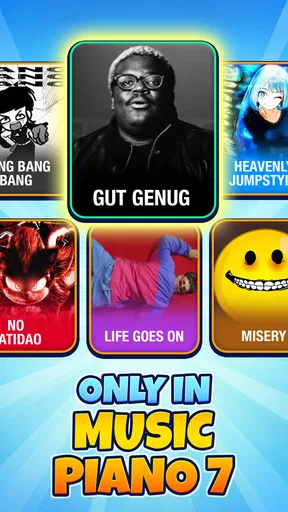
 Analysis by AppCompare
I approached Music Piano 7: Rush Song Games as a quick rhythm game rather than a substitute for learning piano, and that distinction matters. Its appeal is the immediate loop of listening, watching and tapping along: you can pick it up for a short break without first knowing music theory or owning an instrument. I’d recommend it to someone who enjoys testing their timing against a song, while anyone hoping to practise real piano technique should look elsewhere.
What you are getting, and what “free” tells you
This is a music game from Melodya Muses, released on October 12, 2023. It is free to download, rated for Everyone and currently at version 3.4.0; it runs on Android 7.0 or later. Its average rating is 4.8 from around 280,000 ratings, and it has passed 50 million installs. Those figures suggest a widely tried game, but they do not tell me whether a particular player will enjoy its pace or whether every song will suit their taste.
The important spending distinction is simple: the game is free to download. That alone does not establish whether optional purchases are available, what they might cost, or whether they affect play. I would check the current in-game purchase information before spending, especially if a child will be playing. The Everyone age rating is useful context, but it is not a substitute for checking purchase controls on the device.
How the rhythm loop feels in ordinary play
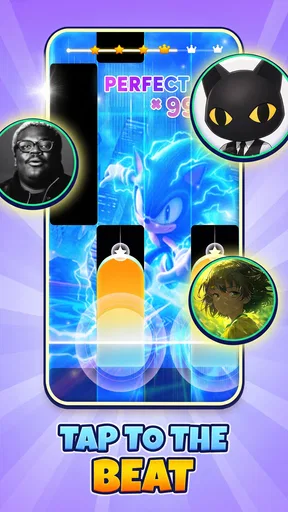
The central task is easy to understand: watch tiles move down the screen and tap them in time. That makes the first session approachable, but it also means the challenge depends on attention and timing more than on musical knowledge. I find that a good fit for a waiting room, a short commute when it is safe to use a phone, or a break between other tasks. It is less suited to moments when interruptions are likely, because losing focus can make a fast sequence harder to follow.
The game’s increasing pace gives a reason to replay songs and work on consistency. A useful way to approach a difficult section is to focus on the beat rather than chasing every tile with your eyes; once the rhythm feels predictable, your taps can become less panicked. If the screen starts to feel frantic, taking a pause is more sensible than treating every missed tap as a reason to keep pushing. The pressure is part of the format, but it should remain enjoyable.
Compared with a traditional piano-learning app, this is a very different kind of practice. It can sharpen attention to rhythm and hand timing in a game setting, but tapping moving tiles is not the same as learning keys, fingering or how to read music. Compared with a slower music game, its faster sequences may be more exciting for players who want a reflex test, but less comfortable for someone seeking a calm listening session. I would choose it for a compact challenge, not as a replacement for lessons or a keyboard.
Fairness, competition and sensible expectations
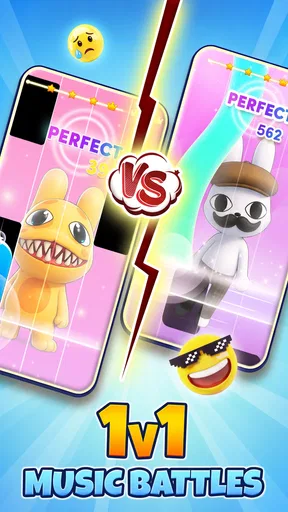
The experience includes a leaderboard challenge, which can give repeat play a social target. I would treat rankings as motivation rather than proof of musical skill: a score in a tile game reflects performance within that game’s rules, not how well someone can play a piano. If competition makes a session more fun, compare results with friends; if it turns a relaxing break into pressure, the songs can still be enjoyed without making the leaderboard the point.
Worth Reading Before You Choose

Baby Panda World Brings Quick Play to Modern Phones, but Its Game Library Feels Busy

ESPN’s Live Game View Makes Following Close Games Easier

QuizzLand Review: A Good Fit for Short Trivia Breaks, Not Every Player

Basketball Stars: Multiplayer Is Fast, but Can It Recover When Matches Go Wrong?

WEBTOON Turns Phone Updates Into a Better Reading Routine

Link to Windows Runs on Shared Habits, Not Social Feeds
For a fair spending judgment, I separate what is established from what is not: the download is free, while the availability and effect of any optional purchases are not established here. I would not assume that spending is necessary to enjoy the basic rhythm idea, nor assume that it can unlock an advantage. Check the purchase details shown on your device before buying anything, and use parental purchase controls where appropriate. That is a more trustworthy approach than guessing from the word “free.”
Who will enjoy it—and when I would pass
I think the strongest audience is someone who likes popular-song rhythm challenges, wants a simple game to dip into, and is comfortable with a screen that asks for quick reactions. It can also work as a low-pressure way to share a music-themed activity with family, as long as everyone understands that the goal is tapping along rather than learning an instrument. A realistic use case is a few rounds while waiting for an appointment: the short-session feel makes more sense there than setting aside an evening for structured practice.
I would skip it if you dislike rapid visual prompts, find score chasing stressful, or want a dependable tool for building piano skills. Someone who prefers to listen without interacting may be happier with a music player, while a learner who wants lessons should choose an app built around instruction and keyboard technique. The game’s broad age rating makes it approachable, but younger players may still need an adult to review device settings and any purchase prompts.
Getting Started with Music Piano 7
When I first downloaded Music Piano 7, I was immediately drawn in by its colorful interface and user-friendly design. The app made it super easy to dive right into the action. No complicated setup, just pure musical bliss. You start with a simple tap and before you know it, you’re already playing tunes that sound like they’re straight out of a professional studio.
The Gameplay Experience
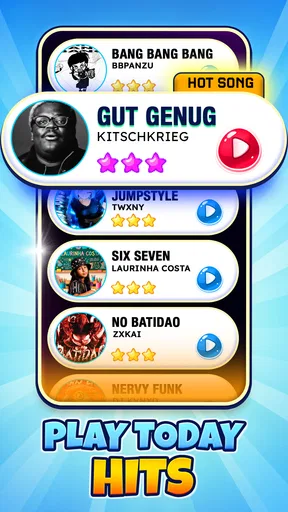
One of the standout features of Music Piano 7 is its intuitive gameplay. You tap on the tiles as they cascade down your screen to play the music. It’s a bit like a musical version of Tetris, but with more rhythm and flair. The app offers a variety of songs, from classical masterpieces to modern hits, ensuring there’s always something fresh to play.
What I really enjoy is the progression system. As you advance, the songs get more challenging, and the tiles come at you faster. It’s addictive, and before long, I found myself lost in the music, trying to master each new level.
Features to Love
Beyond the fun gameplay, there are several features that make Music Piano 7 a must-try app. First off, the graphics are sleek and modern, creating an immersive experience that’s both visually and audibly pleasing. The sound quality is top-notch, giving you the feeling of playing on an actual piano.
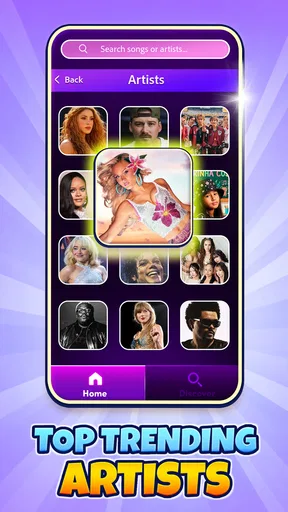
- Variety of Music Styles: From Beethoven to Billie Eilish, the app covers a wide range of genres.
- Customization Options: You can personalize the look of your piano and even choose different sound effects.
- Leaderboard Challenge: Compete with friends or players worldwide. It’s a great way to keep the motivation high.
A small practical tip: I’d choose a look and sound that makes the tiles easy to track before chasing a high score. A decorative style can be fun, but readability matters more once the pace rises. If you’re playing in a shared room, lower the device volume or use headphones so the repeated piano notes don’t become distracting to everyone nearby. That also makes it easier to concentrate on the timing, though you should keep enough awareness of your surroundings if you’re away from home.
The song range is a strength for variety, but it also creates a personal trade-off: a familiar tune can make it easier to anticipate the rhythm, while an unfamiliar one may be more of a reaction test. I’d start with songs I recognize when learning the feel of the game, then switch styles when I want a fresh challenge. That is not a shortcut to a better score so much as a way to separate “I know this melody” from “I can follow the tiles.”
Small choices that make sessions smoother
Because the game asks for visual attention as well as timing, I would play with the phone held steadily and the screen unobstructed. This sounds basic, but a shifting grip or notifications crossing the play area can break concentration at exactly the wrong moment. Before a longer session, turning on a device’s focus or do-not-disturb setting can reduce interruptions; it does not change the game, but it protects the rhythm you are trying to follow.
There is also a useful way to keep the challenge from taking over: decide on a short stopping point before you begin. A quick round or two can be a pleasant break, while repeatedly replaying a difficult part may turn a light game into a score grind. If a song is not clicking, switching to another style can restore the fun rather than forcing progress. For me, that flexibility is more valuable than treating every level as a test I must pass immediately.
One question players often have is whether the game can teach them to play piano. I would not use it for that purpose. The tapping can make rhythm and quick responses feel engaging, but it does not replace practising on piano keys or following a structured lesson. Another reasonable question is whether it works for a very casual player: the simple tap-based idea makes it easy to try, although faster sequences may still frustrate someone who dislikes reflex games.
My trust verdict
My recommendation is qualified but positive: try it if a free-to-download rhythm game sounds appealing, and judge it by whether the songs and speed keep you entertained. The high average rating and broad install reach show that many people have tried it, but neither guarantees a perfect match for your preferences. I would keep expectations clear, check purchase information before spending, and remember that its leaderboard measures game performance rather than musical ability.
In a crowded music-game category, the tile format gives this title a direct, hands-on feel, while its changing pace supplies the pressure that keeps each attempt active. That is precisely why I would choose it over a passive music app when I want to do something with a melody, but choose a learning tool or an ordinary player when my aim is practice or relaxed listening. The right choice depends on the mood, not on treating one kind of app as a replacement for the other.
Why You Should Download It
In a world where finding a moment of joy can sometimes be tough, Music Piano 7 delivers it in spades. It’s more than just a game; it’s a way to relax, unwind, and maybe even discover a hidden musical talent. Plus, it’s perfect for all ages, so you can enjoy it with family and friends.
So, if you’re ready to embark on a musical journey that’s both entertaining and challenging, give Music Piano 7 a try. It’s available for both Android and iOS, and trust me, you won’t regret it. Happy playing!
Pros
- Engaging gameplay with intuitive controls.
- Wide variety of popular songs to choose from.
- Regular updates with new tracks.
- Offline mode for uninterrupted play.
- Visually appealing with vibrant graphics.
Cons
- Contains ads that can interrupt gameplay.
- Limited free content; in-app purchases needed.
- Requires a stable internet for updates.
- Battery consumption can be high.
- Occasional lag on older devices.
FAQs for Music Piano 7: Rush Song Games
What is Music Piano 7: Rush Song Games and how does it work?
Music Piano 7: Rush Song Games is an engaging mobile app that combines the thrill of a rhythm game with the joy of playing piano. Players tap on the screen to match the rhythm of popular songs, enhancing their musical skills. It offers various difficulty levels and an extensive song library to keep users entertained.
Is Music Piano 7: Rush Song Games free to download and play?
Yes, Music Piano 7: Rush Song Games is free to download on both Android and iOS platforms. However, it includes in-app purchases and ads. Players can buy additional songs or remove ads for a more seamless experience. It's advisable to check the in-app purchase options if you're looking to enhance your gameplay.
What are the main features of Music Piano 7: Rush Song Games?
The app features a vast library of popular songs across various genres. It offers multiple difficulty levels, allowing beginners and advanced players to enjoy. The game includes a leaderboard to track your progress and compete with friends. Additionally, it boasts high-quality sound and intuitive controls for an immersive experience.
Can I play Music Piano 7: Rush Song Games offline?
Music Piano 7: Rush Song Games requires an internet connection to download new songs and updates. However, once downloaded, you can play the songs offline. Keep in mind that some features, such as leaderboards and certain rewards, may only be accessible while online.
Is Music Piano 7: Rush Song Games suitable for children?
Yes, Music Piano 7: Rush Song Games is suitable for children, as it offers an educational aspect through learning rhythm and music. The app is designed to be user-friendly and does not contain inappropriate content. Parents should be aware of in-app purchases and ensure they are managed appropriately.


